Showing posts with label Android. Show all posts
Iphone vs Android: Which One Reigns Supreme?

Iphone vs Android: Which One Reigns Supreme?

When it comes to smartphones, the two giants in the industry are undoubtedly Apple's iPhone and Google's Android. Each operating system has its own set of pros and cons, and choosing between the two can be a daunting task. In this article, we'll dive deep into the features and functionality of both iPhone and Android and help you decide which one is right for you.


Design and Build Quality

The design and build quality of a smartphone can significantly impact user experience. Apple's iPhone is known for its sleek and premium design, featuring a glass front and back with a stainless steel frame. On the other hand, Android devices come in a wide range of designs and build quality, from budget devices with plastic builds to high-end smartphones with premium materials like glass and metal.

Display

The display is one of the most important features of a smartphone, as it is the primary way users interact with their device. Both iPhone and Android devices come with high-quality displays, but there are some key differences to consider. Apple's iPhone features an OLED or LCD display, depending on the model, with a resolution of up to 2532 x 1170 pixels. Android devices, on the other hand, feature a wide range of display types, including OLED, LCD, and AMOLED, with resolutions up to 3840 x 2160 pixels.

Operating System

The operating system is the software that powers a smartphone, and it can significantly impact the user experience. Apple's iOS is known for its ease of use and intuitive interface, making it a popular choice for users who are new to smartphones. Android, on the other hand, is known for its customizability, allowing users to customize the look and feel of their device with widgets, custom launchers, and more.

Camera

The camera is one of the most important features of a smartphone, and both iPhone and Android devices come with high-quality cameras. Apple's iPhone features a range of cameras, from a single lens to a triple-lens setup, with features like Night Mode and Portrait Mode. Android devices also feature high-quality cameras, with some devices featuring multiple lenses and features like Night Mode and Wide Angle.

Battery Life

Battery life is an important consideration when choosing a smartphone, as it impacts how long you can use your device without needing to charge it. Apple's iPhone typically has a smaller battery compared to Android devices, but it is optimized for efficient use, allowing it to last longer on a single charge. Android devices, on the other hand, come with a wide range of battery sizes, with some devices lasting up to two days on a single charge.


Conclusion

When it comes to choosing between iPhone and Android, there is no one-size-fits-all answer. Each operating system has its own set of pros and cons, and the best choice for you will depend on your personal preferences and needs. If you value premium design and ease of use, then the iPhone may be the best choice for you. However, if you prefer customizability and a wide range of devices to choose from, then Android may be the way to go.

How to Download Free Music to your Android Phone

On this article guys, I'm gonna show you how to download free music to your android device using the popular app which is the Snaptube.  
 

Instruction

Step-1: Download Snaptube Application Installer (APK)

SnapTube is a simple tool to download any video from YouTube, Vmeo, Facebook and any other site in an easy, fast and convenient way so you can play it later without an internet connection. In this app, you can also choose to download the video as mp3 file. 
Snaptube is app outside Google Play Store. 

Snaptube DOWNLOAD LINK

Step-2: Install Snap Tube APK

After downloading Snaptube apk, you need to Install the file. In default, android system do not allow you to install apps outside of Google Play Store. To enable installation APK outside Google Play Store follow instruction:

1. Go to Settings then Security and lock screen or on other devices this might just be called Security.
2. Check "Allow installation from unknown sources". By checking that settings, you'll be able to install APK files downloaded from outside the Google Play Store. 

Often, if you're prompted to allow installation of files from unknown sources while actually trying to install one, a pop up message will ask you if you want to allow just this installation, or to allow them by default. 


Step-3: Use Snaptube APP to Download

Steps
1. Open the Snaptube App
2. Search for the music the you like then hit search key on your keyboard


3. Select from the search list by pressing the song that you want to download. 


4. After you select, tap the yellow mark at the bottom right corner of your screen which indicates the number of selected video that you made.


5. For Download Video as, select MP3128K, then hit the Star Download button.


6. To see the download progress, hit the download icon from the top right corner of the screen. 


7. All you have to do is wait the download to finish and your DONE.

HOW TO DOWNLOAD UNLIMITED FREE MUSIC, ALBUMS ON ANDROID DEVICE

Nowadays, listening to music from Android devices are now easier than before, because of many available apps out there that makes it easier for you to download music. 

On this tutorial you will get the best music experience on your android device using one of the best android music application, FILDO. 

Instruction

1. Go to your Android device then, go to settings > security
2. Enable/Check  unknown sources settings. By enabling it, you allow installation of applications from uknown sources, or application outside Google Play Store.
 

3. Download FILDO Android Application here, and install it on your android device.

4. Open the application. 
5. You can find instruction below on how to play/download music using the Fildo Music Application. 


HOW TO DOWNLOAD MUSIC

HOW TO DOWNLOAD MUSIC ALBUM

Note: If you will use other music application after you download music from Fildo application, other music player need to re-scan your device for music files to load newly downloaded music. 


Watch video 


How to Secure Your Android Device


Your phone is not just a phone that you need it when you want to call or text people. Nowaday's it now contain's more important things like emails, images, different accounts from different websites that is really important to you. So security really matters.


On this article, I'm gonna list important thing's you should know on how to secure your android phone.

1. Do not leave 'Unknown sources' enabled

 
-Every Android phone includes the ability to install apps that do not come from the Google Play Store, There are good reasons to install apps that aren't in the Google Play Store, but for the majority of users out there all you really need to know is you should only install apps outside of the Google Play Store if you know without a doubt the app is safe.
 
2. Avoid illegitimate apps


 -When downloading apps it’s imperative that you only do so from a legitimate app store; that means from companies like Google Playstore, Amazon, Samsung, or another major manufacturer or carrier.


3. Read app permissions


-Every app you install on any Android device must tell you what parts of the OS, including your personal data, that app is going to have access to. This information is shown to you in between you deciding to install the app and the software actually being installed on your device, giving you time to look over what that app wants access to. Read the app permissions, and don't be afraid to ask why certain apps ask for the permissions you see in that list. While there's usually a good reason for that permission request, you're better off knowing for sure.


4. Update Android System/Applications


Why Update? Having the latest versions of your applications is important for a variety of reasons:


Security: New versions often fix security vulnerabilities in older versions of software. For example, if you’re running an older version of Internet Explorer and haven’t installed the latest updates for it from Windows Update, your version of Internet Explorer may be insecure. If you visit a malicious website, that website could compromise your system and install malicious software – for example, software that logs your online banking information or credit card numbers and sends it to an unscrupulous person over the Internet.


Stability: New versions of software also fix other, non-security-related bugs. For example, a new version could solve crashes you may be experiencing or make a feature work properly.


Features: Major new versions of software generally add new features you can take advantage of. For example, updating the Mozilla Firefox browser to a new major release will give you new browser features.


Performance: New versions of software can also increase the software’s performance – for example, if you’re still using Internet Explorer 6, you’ll see a big web-browsing speed increase if you update to Internet Explorer 9.


How to Download Free Music on Android Phone or Tablet 2017

There's no doubt that listening to music can instantly put you in a good mood. Now most of us would like to listen to music on the go on different mobile like the most popular android phone. On this tutorial I will teach you how to download free music on your Android Phone or Tablet.


How to Download Free Music on Android Phone or Tablet

Instruction

1. Open Google Chrome Web Browser
2. Go to www.mp3juices.cc
3. If you try to search and download for music from the site,  it will redirect you to different links/website which is very annoying. So we need to disable the JavaScript of web browser and add www.mp3juices.cc to the exceptions. On this tutorial, I am using Google Chrome. Its a different way on how to disable JavaScript on other web browser, so I recommend you to use Google Chrome to follow the step exactly.
4. See How to Disable Javascript of Google Chrome below.
5. Once your done in disabling javascript of Google Chrome Web browser, you can now search and download song you like.
6. Enjoy :-)


How to disable Google Chrome Javascript (add www.mp3juices.cc to exceptions)

1. Tap the three dot icon at the top right corner of the browser.


2. Goto Settings->Site Settings->JavaScript then disable the Javascript.

3. Tap the "ADD SITE EXCEPTION" and add www.mp3juices.cc to the Site URL then tap Add


Watch Video


How To Change Android MAC Address Without Rooting


There are many reasons that you want to change the MAC address of your Android device. For instance, if you want to connect to the WiFi then it will be a good idea to change the MAC address temporarily to protect your privacy, there is also an instance that your router has a blocking feature and you accidentally blocked your own device, so you want to change your device MAC address to be able to connect again to your router.

Note: This only works only for Chamelephon devices/any MediaTek device


Instruction

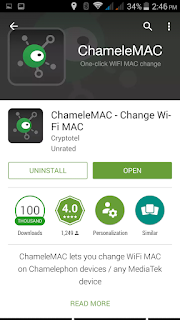
1. Go to Play Store and Search for "ChameleMAC", then install it to your android device.


2. Once you installed it. Open the App


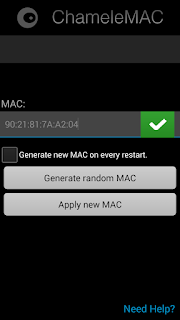
3. You can now change your device MAC Address from the MAC Textbox, or you can tap the button "Generate random MAC" to provide MAC for you.

How to Find Your Routers IP Address on Android Device

1. Make sure that your device is connected to your router.
2. Go to Google Play Store, search for "Wifi Analayzer" and install the Wifi Analyzer by farproc
3. Open the Wifi Analayzer Application
4. Slide to the left twice or you can select the "Eyes" like icon and select “AP list”


5. You’ll see a “Connected to: [Network Name]” header. Tap that and a window will appear with more information about your network. You’ll find the router’s IP address to the right of “Gateway”.


Watch Video 


How To Sign Out Yahoo Mail On Android 2016

This is a quick tutorial on How to Sign Out Yahoo Mail On Android

Note: Removing the account from the app doesn't delete the account or the mail in it.
  1. Tap the Menu icon .
  2. Tap Settings .
  3. Tap Manage accounts.
  4. Swipe to the account you want to remove from the app.
  5. Tap Sign Out.


Watch Video

How to logout/switch account from Facebook Messenger on Android Easy Way!


Before there is no any option to logout from facebook messenger app. But on their latest update, they already included the settings to logout and switch account. This video will show you How to logout/switch account from Facebook Messenger on Android.

Watch Video